Microsoft® IntelliMouse® TrackBall
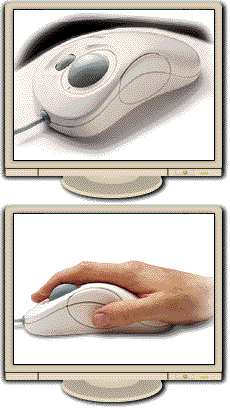
Microsoft IntelliMouse TrackBall Precision and comfort in a very smart design. Improve the way you work with Microsoft IntelliMouse TrackBall.

Microsoft IntelliMouse TrackBall is designed for comfort and efficiency. Its unique shape fits your hand and supports it in a natural position. Simply roll the wheel to scroll instead of clicking on a scroll bar, or work hands free with the AutoScroll feature.

Uniquely designed for comfort and efficiency!


Microsoft Pointing Devices Web Site

Product Screen Shot
  • Experience comfort and accuracy with precise fingertip control.
  • Control the pointer without moving your wrist or arm—so you’re more relaxed while you work.
  • Scroll smoothly and precisely through screens of information with a simple roll of the wheel.
  • Watch information roll past automatically at whatever speed you choose—hands-free—with the AutoScroll feature.
  • Zoom quickly in or out by holding the CTRL key while rolling the wheel (in Microsoft Office 97–compatible applications).
  • Rely on the Microsoft guarantee. If you’re not satisfied with your IntelliMouse TrackBall for any reason, return it within 30 days of purchase for a full refund.


System Requirements

®

Computer
Any IBM-compatible CPU
Hard-Disk
12.2 MB of available hard-disk space
Drives
3.5" disk drive
Operating System
Windows
® 95, Windows 98, Windows NT® Server 4.0, or Windows NT Workstation 4.0
Peripherals/Miscellaneous
IntelliPoint version 2.2 software (included)
Round mouse port (PS/2) or 9 pin serial port (coupon included for 25 pin serial port adapter)
Note: To use Microsoft IntelliMouse TrackBall as a two button mouse you need Windows 95 or later, Windows 3.1 or later, MS DOS® version 3.1 or later, or Windows NT Workstation 3.51 or later operating system.

Related Products

Basic Mouse
Basic Mouse
Wheel Mouse
Wheel Mouse
Mouse 2.0
Mouse 2.0
IntelliMouse
IntelliMouse

IntelliMouse Pro
IntelliMouse Pro